inotifywait Là Gì?
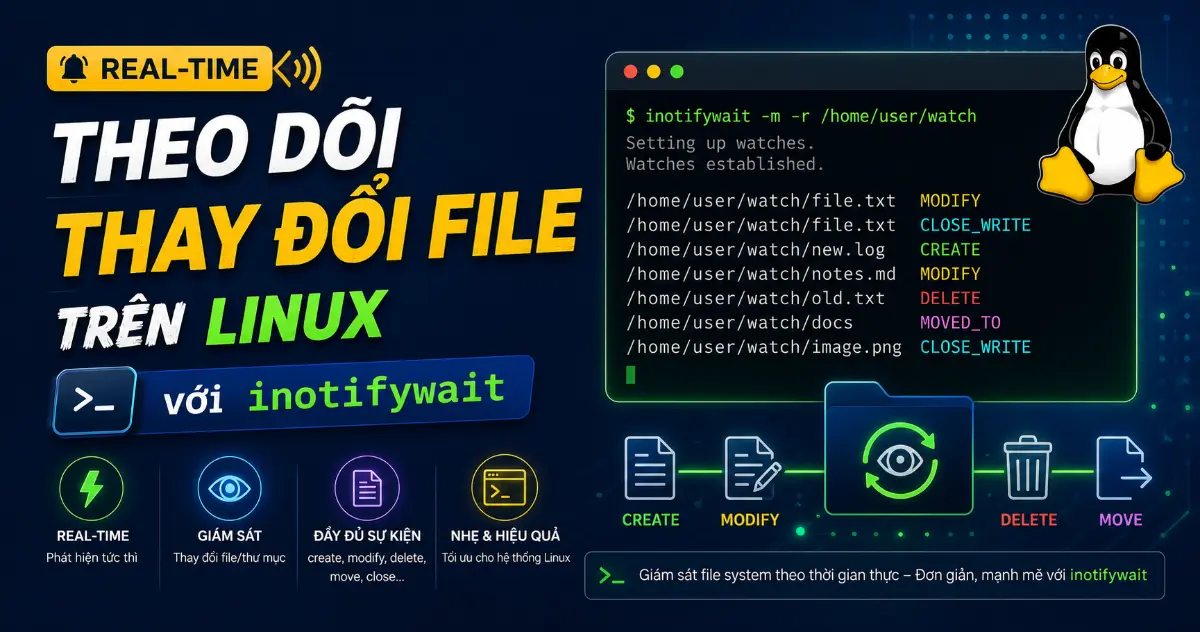
inotifywait là một command-line utility trên Linux giúp theo dõi thay đổi file và directory theo thời gian thực (real-time). Công cụ này hoạt động dựa trên inotify — một kernel subsystem có sẵn trong Linux từ phiên bản kernel 2.6.13, cho phép userspace ứng dụng nhận thông báo ngay khi có sự kiện filesystem xảy ra.
Khác với cách tiếp cận polling (lặp while sleep 1; do ...; done rồi kiểm tra liên tục), inotifywait đăng ký watch với kernel và chỉ “thức giấc” khi có event thực sự xảy ra. Kết quả: CPU gần như idle khi không có thay đổi, và phản hồi tức thì khi file thay đổi — không delay, không tốn tài nguyên.
Tại Sao Nên Dùng inotifywait Thay Vì Polling?
- Polling tốn CPU và I/O — mỗi lần kiểm tra tiêu tốn tài nguyên, kể cả khi không có gì thay đổi.
- Polling có độ trễ — interval ngắn thì tốn tài nguyên, interval dài thì phát hiện chậm.
- Chi phí polling tăng theo số file — càng nhiều file, càng tốn kém để scan.
- inotifywait event-driven — kernel tự động push event, idle load gần bằng 0, phản hồi ngay lập tức.
Cài Đặt inotifywait Trên Linux
inotifywait nằm trong gói inotify-tools, có sẵn trên repo chính thức của hầu hết các distro:
Ubuntu / Debian
sudo apt install inotify-toolsFedora / RHEL / Rocky / AlmaLinux
sudo dnf install inotify-toolsLưu ý: trên RHEL/Rocky/AlmaLinux có thể cần bật EPEL repo trước.
Arch Linux
sudo pacman -S inotify-toolsGentoo
sudo emerge --ask sys-fs/inotify-toolsXác nhận cài đặt
inotifywait --help | head -n 1
# Output: inotifywait 3.22.6.0
Các Sự Kiện Filesystem Mà inotifywait Theo Dõi
inotifywait có thể theo dõi nhiều loại sự kiện filesystem. Dưới đây là các event phổ biến nhất:
| Event | Kích hoạt khi |
|---|---|
access | File được đọc |
modify | File được ghi nội dung (có thể fire nhiều lần per save) |
attrib | Metadata thay đổi (permission, owner, timestamp…) |
close_write | File mở ở chế độ writable được đóng — tức là lưu xong |
close_nowrite | File mở ở chế độ read-only được đóng |
close | File đóng bất kể chế độ mở (close_write + close_nowrite) |
open | File được mở |
moved_to | File/directory được di chuyển VÀO thư mục đang theo dõi |
moved_from | File/directory được di chuyển RA khỏi thư mục đang theo dõi |
move | moved_to + moved_from |
move_self | File/directory đang theo dõi bị di chuyển |
create | File/directory mới được tạo trong thư mục theo dõi |
delete | File/directory bị xóa trong thư mục theo dõi |
delete_self | File/directory đang theo dõi bị xóa |
unmount | Filesystem chứa file/directory bị unmount |
Sử Dụng inotifywait: Từ Cơ Bản Đến Nâng Cao
1. Theo Dõi Một Lần (One-shot)
Mặc định, inotifywait chờ đến khi có 1 event xảy ra, in ra rồi thoát:
inotifywait /tmp/watchdir
# Setting up watches.
# Watches established.
Mở terminal khác, tạo file trong thư mục đó:
touch /tmp/watchdir/test.txtTerminal inotifywait sẽ hiện:
/tmp/watchdir/ CREATE test.txt2. Theo Dõi Liên Tục (Monitor Mode)
Flag -m (--monitor) khiến inotifywait tiếp tục chạy và phát event liên tục:
inotifywait -m /tmp/watchdirMỗi thao tác trên file sẽ sinh ra nhiều event. Ví dụ khi đọc file:
/tmp/watchdir/ OPEN test.txt
/tmp/watchdir/ ACCESS test.txt
/tmp/watchdir/ CLOSE_NOWRITE,CLOSE test.txt
3. Lọc Theo Sự Kiện Cụ Thể
Flag -e (--event) giúp chỉ theo dõi những event bạn quan tâm:
# Chỉ theo dõi file được tạo và xóa
inotifywait -m -e create,delete /tmp/watchdir

# Chỉ theo dõi khi file sửa xong (lưu xong)
inotifywait -m -e close_write /tmp/watchdir

# Theo dõi nhiều event riêng lẻ
inotifywait -m -e create -e close_write -e delete /tmp/watchdir
4. Theo Dõi Đệ Quy (Recursive)
Flag -r (--recursive) theo dõi tất cả file và subdirectory:
inotifywait -m -r -e close_write /var/wwwLưu ý: mỗi directory tiêu tốn 1 watch slot. Nếu thư mục quá lớn, bạn có thể gặp lỗi giới hạn — xem phần xử lý max_user_watches bên dưới.
5. Định Dạng Output Dễ Parse
Output mặc định khó parse trong script. Dùng --format để tùy chỉnh:
inotifywait -m -q \
    --timefmt '%F %T' \
    --format '%T | %e | %w%f' \
    -e close_write /tmp/watchdir
Output:
2026-06-19 14:30:11 | CLOSE_WRITE,CLOSE | /tmp/watchdir/report.csvCác format specifier quan trọng:
%w— đường dẫn thư mục đang theo dõi%f— tên file xảy ra event%e— tên event (phẩy cách)%T— timestamp (cần đi kèm--timefmt)%w%f— full path đến file
6. Loại Trừ File Khỏi Việc Theo Dõi
# Loại trừ file .xml
inotifywait -m /path/to/dir --exclude ".*.xml"

# Loại trừ thư mục .git (case-insensitive)
inotifywait -m -r --excludei '\.git/' /repo

# Chỉ theo dõi file .py
inotifywait -m -r --include '.*\.py$' /project
--exclude và --include nhận POSIX regular expression. Dùng --excludei / --includei cho case-insensitive.
7. Timeout — Thoát Nếu Không Có Event
# Thoát sau 30 giây nếu không có event
inotifywait -t 30 -e close_write /tmp/watchdir
Khi timeout, exit status là 2. Hữu ích khi bạn muốn chờ event trong khoảng thời gian giới hạn.
Lưu Ý Quan Trọng: close_write vs modify
Đây là lỗi phổ biến nhất khi dùng inotifywait. Nhiều người dùng -e modify để bắt event “file được sửa”, nhưng modify fire mỗi lần có dữ liệu ghi vào file. Một editor có thể ghi nhiều lần trong một lần save — kết quả: cùng một file, bạn nhận 3-5 event modify.
Giải pháp: dùng -e close_write. Event close_write chỉ fire khi file mở ở chế độ writable được đóng lại — tức là quá trình ghi hoàn tất. Mỗi lần save, bạn nhận đúng 1 event.
# SAI — fire nhiều lần per save
inotifywait -m -e modify /var/log/app.log

# ĐÚNG — fire 1 lần khi save xong
inotifywait -m -e close_write /var/log/app.log
Vượt Qua Giới Hạn max_user_watches
Khi theo dõi recursive một directory tree lớn, bạn có thể gặp lỗi:
Failed to watch /var/www; upper limit on inotify watches reached!
Please increase the amount of inotify watches allowed per user via
`/proc/sys/fs/inotify/max_user_watches'.
Kiểm tra giới hạn hiện tại:
cat /proc/sys/fs/inotify/max_user_watches
# Mặc định thường là 8192
Tăng tạm thời (mất khi reboot):
sudo sysctl fs.inotify.max_user_watches=524288Thiết lập vĩnh viễn:
echo 'fs.inotify.max_user_watches=524288' | sudo tee /etc/sysctl.d/90-inotify.conf
sudo sysctl --system
Ví Dụ Thực Tế: Script Tự Động Xử Lý Khi File Thay Đổi
Auto-rebuild Project Khi Source Code Thay Đổi
#!/usr/bin/env bash
# Auto-rebuild khi source thay đổi

while true; do
    inotifywait -e modify,create,delete -r src
    make
done
Xử Lý Tự Động File CSV Được Upload Vào Thư Mục
#!/usr/bin/env bash
set -euo pipefail

WATCH_DIR=/var/spool/incoming

inotifywait -m -q \
    --format '%w%f' \
    -e close_write \
    "$WATCH_DIR" |
while read -r filepath; do
    case "$filepath" in
        *.csv)
            echo "Processing: $filepath"
            # Chạy xử lý thực tế ở đây
            python3 process_csv.py "$filepath"
            ;;
        *)
            echo "Skipping: $filepath"
            ;;
    esac
done
Giám Sát Log File Và Gửi Alert
#!/usr/bin/env bash
# Giám sát log và alert khi có ERROR

inotifywait -m -q \
    --format '%T %w%f' \
    --timefmt '%H:%M:%S' \
    -e modify /var/log/app.log |
while read -r time filepath; do
    if grep -q "ERROR" "$filepath"; then
        curl -X POST "https://hooks.slack.com/services/XXX/YYY/ZZZ" \
            -H "Content-Type: application/json" \
            -d "{\"text\":\"[$time] ERROR detected in $filepath\"}"
    fi
done
Đồng Bộ File Tự Động Giữa Hai Thư Mục
#!/usr/bin/env bash
# Sync file từ source sang destination khi có thay đổi

SOURCE=/var/www/uploads
DEST=/backup/uploads

inotifywait -m -q -r \
    --format '%w%f' \
    -e close_write -e moved_to \
    "$SOURCE" |
while read -r filepath; do
    relative="${filepath#$SOURCE/}"
    mkdir -p "$DEST/$(dirname "$relative")"
    cp -p "$filepath" "$DEST/$relative"
    echo "Synced: $relative"
done
Reload Nginx Khi Config Thay Đổi
#!/usr/bin/env bash
# Auto-reload nginx khi config thay đổi

inotifywait -m -q \
    --format '%w%f' \
    -e close_write \
    /etc/nginx/conf.d/ |
while read -r filepath; do
    if nginx -t 2>/dev/null; then
        nginx -s reload
        echo "Nginx reloaded after change: $filepath"
    else
        echo "Config test failed, skipping reload: $filepath"
    fi
done
Xử Lý Atomic Save Của Editor
Nhiều editor (vim, VS Code…) lưu file theo cơ chế atomic save: ghi ra file tạm, rồi rename đè lên file gốc. Trong trường hợp này, thay đổi không hiện dưới dạng close_write mà là moved_to hoặc create.
Để bắt đầy đủ cả 2 trường hợp, theo dõi cả close_write và moved_to:
inotifywait -m -e close_write,moved_to /path/to/dirChạy inotifywait Với systemd
Để chạy inotifywait dưới dạng service, tạo unit file systemd:
[Unit]
Description=Watch incoming directory and process CSV files
After=network.target

[Service]
Type=simple
ExecStart=/usr/local/bin/csv-processor.sh
Restart=on-failure
RestartSec=5

[Install]
WantedBy=multi-user.target
sudo systemctl daemon-reload
sudo systemctl enable csv-processor
sudo systemctl start csv-processorGiới Hạn Cần Biết
- Chỉ hoạt động trên local filesystem — NFS, CIFS, FUSE có thể không report event từ host khác. Với network filesystem, cần dùng polling hoặc cơ chế khác.
- Mỗi directory tiêu tốn 1 watch — theo dõi recursive directory lớn cần tăng
max_user_watches. - Race condition với subdirectory mới — directory tạo sau khi
inotifywait -rkhởi chạy có thể miss event trong khoảng thời gian ngắn trước khi watch được add. - inotifywatch — công cụ kèm trong
inotify-toolscho thống kê event (file nào accessed bao nhiêu lần), khác với inotifywait stream event từng cái một.
inotifywait vs incron vs fswatch
| Tiêu chí | inotifywait | incron | fswatch |
|---|---|---|---|
| Nền tảng | Linux (inotify kernel) | Linux (inotify kernel) | Cross-platform |
| Cách chạy | CLI, pipe vào script | Cron-like config file | CLI, cross-platform |
| Độ linh hoạt | Rất cao — pipe, format, filter | Trung bình — config file | Cao — nhưng abstract hơn |
| Phụ thuộc | inotify-tools | incron daemon | fswatch + backend OS |
| Phù hợp | Script automation, one-liner | Rule-based persistent monitoring | Cần cross-platform |
Kết Luận
inotifywait là công cụ không thể thiếu cho bất kỳ Linux sysadmin hay devOps engineer nào cần theo dõi thay đổi file real-time. Nhờ tận dụng inotify kernel subsystem, nó phản hồi tức thì, không tốn CPU khi idle, và dễ dàng tích hợp vào shell script. Từ auto-rebuild project, giám sát log, đồng bộ file, đến reload config — inotifywait giải quyết tất cả bằng một lệnh đơn giản.
Hãy nhớ hai pitfall quan trọng nhất: dùng close_write thay vì modify để bắt event “lưu xong”, và tăng max_user_watches khi theo dõi directory tree lớn. Nắm được hai điều này, bạn đã dùng inotifywait hiệu quả trong mọi kịch bản production.
Tham Khảo

Bài viết mới nhất


Ủng hộ

MB Bank: 0969089335 - CHÂU QUỐC HÙNG

MB Bank: 0969089335 - CHÂU QUỐC HÙNG

Momo: 0969089335 - CHÂU QUỐC HÙNG