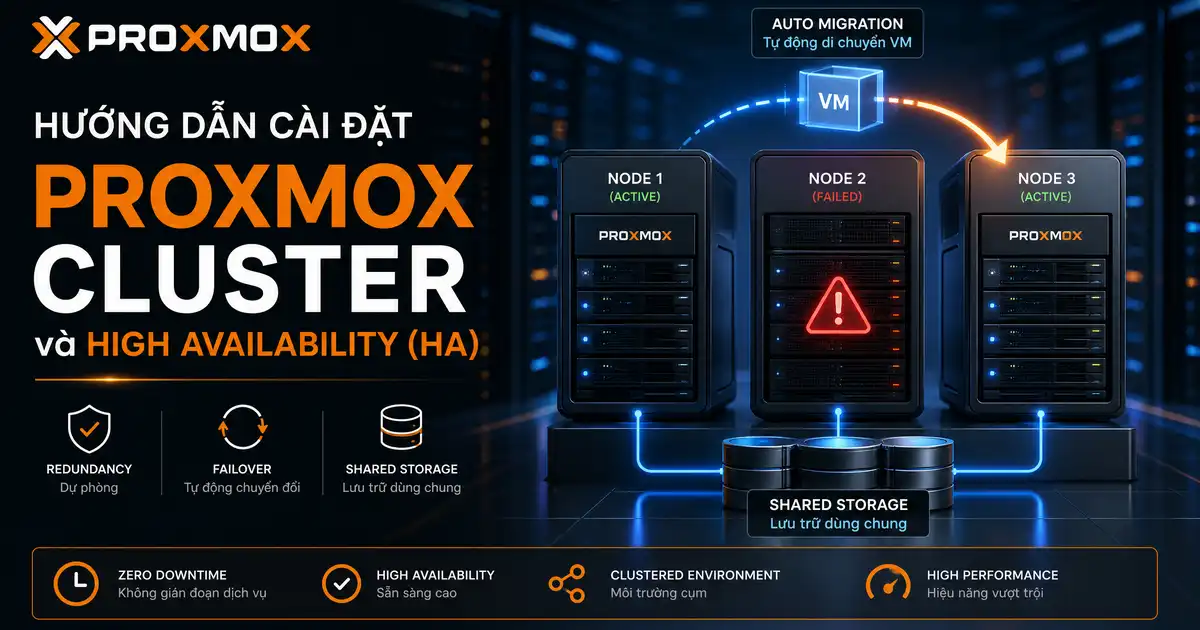
Trong kỷ nguyên ảo hóa trung tâm dữ liệu hiện đại, việc vận hành một máy chủ Proxmox VE đơn lẻ (Standalone Node) luôn tiềm ẩn rủi ro rất lớn đối với tính liên tục của doanh nghiệp. Khi phần cứng máy chủ gặp sự cố như hỏng nguồn, lỗi thanh RAM hoặc cháy thanh ổ cứng, toàn bộ máy ảo (VM) và container (LXC) đang chạy trên đó sẽ lập tức ngừng hoạt động. Để xóa bỏ điểm nghẽn duy nhất này, xây dựng Proxmox Cluster là giải pháp kỹ thuật bắt buộc.
Thực tế thì, việc liên kết nhiều máy chủ vật lý thành một cụm máy chủ proxmox thống nhất không chỉ mang lại khả năng quản lý tập trung từ một giao diện Web duy nhất, mà còn mở ra sức mạnh của tính năng proxmox high availability (HA). Khi một nút mạng bị sập, hệ thống quản lý cụm sẽ tự động kích hoạt máy ảo dự phòng trên một nút khác chỉ sau vài giây mà không cần con người phải can thiệp thủ công.
Trong cẩm nang kỹ thuật thực chiến này, mình sẽ hướng dẫn bạn toàn bộ quy trình 6 bước cài đặt proxmox cluster chuẩn mực, đi sâu vào cơ chế đồng thuận Corosync, giải pháp lưu trữ phân tán Ceph, cách thức cấu hình ha proxmox an toàn và kỹ thuật thiết lập Watchdog chống thảm họa phân rã não (Split-Brain) thường gặp.
Bản chất kỹ thuật: Proxmox Cluster là gì và kiến trúc đồng thuận Corosync
Để triển khai thành công, chúng ta cần nắm vững bản chất Proxmox Cluster là gì. Về mặt kiến trúc, đây là tập hợp từ hai hoặc nhiều máy chủ vật lý cài đặt Proxmox Virtual Environment (PVE) được kết nối với nhau thông qua mạng nội bộ tốc độ cao và chia sẻ chung một hệ thống tệp tin cấu hình cụm gọi là pmxcfs (Proxmox Cluster File System).
Trái tim vận hành của Proxmox Cluster chính là giao thức truyền thông cụm, bạn có thể tham khảo thêm giao thức quản lý trạng thái cụm Corosync Cluster Engine. Corosync chịu trách nhiệm liên tục gửi các gói tin nhịp tim (Heartbeat) giữa các nút mạng, duy trì trạng thái bầu chọn số lượng biểu quyết (Quorum) và đồng bộ hóa các tệp tin cấu hình tức thời qua pmxcfs.
Bạn có thể tham khảo chi tiết tại tài liệu chính thức về Proxmox Cluster Manager. Hệ thống quản lý cụm pvecm cung cấp các nguyên lý hoạt động cốt lõi sau:
- Giao diện quản lý tập trung đa nút: Bạn có thể đăng nhập vào địa chỉ Web UI của bất kỳ nút nào trong cụm để điều khiển toàn bộ tài nguyên máy ảo của các nút còn lại.
- Hệ thống tệp tin pmxcfs phân tán: Toàn bộ tệp tin cấu hình tại thư mục /etc/pve được đồng bộ hóa dựa trên cơ chế bộ nhớ đệm chia sẻ, đảm bảo mọi thay đổi cấu hình trên một nút đều có hiệu lực ngay lập tức trên toàn cụm.
- Cơ chế biểu quyết Quorum: Đảm bảo cụm chỉ cho phép ghi dữ liệu khi có hơn 50% số nút mạng đang trực tuyến, ngăn chặn tuyệt đối tình trạng phân rã dữ liệu.
- Tính năng di chuyển máy ảo trực tiếp (Live Migration): Cho phép bạn chuyển một máy ảo đang hoạt động từ máy chủ này sang máy chủ khác mà người dùng truy cập không hề cảm nhận thấy sự gián đoạn mạng.
Điều kiện phần cứng và thiết kế mạng chuyên dụng cho cụm máy chủ Proxmox
Một sai lầm rất phổ biến của người mới bắt đầu thiết lập Proxmox Cluster là tận dụng các đường truyền mạng nội bộ chất lượng thấp. Corosync đòi hỏi độ trễ cực thấp và khả năng truyền phát gói tin ổn định, nếu mạng chập chờn, cụm sẽ liên tục bị mất Quorum và tự cô lập máy chủ.
Để xây dựng một cụm máy chủ proxmox đạt chuẩn doanh nghiệp, bạn cần đáp ứng các tiêu chí hạ tầng nghiêm ngặt sau:
- Quy tắc số nút tối thiểu (Quy tắc số lẻ): Một cụm HA tối thiểu phải có từ 3 nút vật lý trở lên (3, 5, 7 nút) để luôn có thể đạt được đa số phiếu bầu Quorum. Nếu bạn chỉ có 2 máy chủ, bạn bắt buộc phải cấu hình thêm một thiết bị QDevice phụ bên ngoài.
- Đường mạng riêng biệt cho Corosync (Dedicated Corosync Network): Tuyệt đối không để lưu lượng truyền thông Corosync chạy chung với đường truyền tải tệp tin nặng của máy ảo. Hãy trang bị card mạng riêng biệt với độ trễ dưới 2 mili-giây.
- Dự phòng liên kết mạng (Corosync Redundant Links): Cấu hình ít nhất hai liên kết mạng độc lập (Link 0 và Link 1) để Corosync tự động chuyển mạch nếu một sợi cáp quang hoặc switch mạng bị đứt.
- Đồng bộ hóa thời gian tuyệt đối qua NTP: Tất cả các nút trong Proxmox Cluster phải được đồng bộ thời gian thông qua máy chủ Chrony hoặc NTP chung, độ lệch thời gian không được vượt quá vài mili-giây.
Bạn có thể kết hợp việc phân vùng mạng này với hướng dẫn cấu hình Network Proxmox với Bridge và VLAN để cô lập hoàn toàn lưu lượng quản trị, lưu lượng lưu trữ và lưu lượng mạng của máy ảo.
6 bước cài đặt Proxmox Cluster và cấu hình High Availability chuẩn mực
Dưới đây là quy trình thực chiến 6 bước cài đặt proxmox cluster từng bước an toàn, giúp bạn thiết lập cụm máy ảo có khả năng tự phục hồi mà không làm mất mát cấu hình hiện có.
Bước 1: Chuẩn bị phân giải tên miền nội bộ và bảo mật SSH
Trước khi gộp cụm Proxmox Cluster, hãy đảm bảo các nút có thể phân giải tên miền của nhau thông qua tệp tin /etc/hosts trên hệ điều hành. Đồng thời, hãy thực hiện thiết lập bảo mật SSH Hardening trên Linux để đảm bảo kênh truyền thông quản trị an toàn tuyệt đối:
# Kiem tra va cap nhat tep tin /etc/hosts tren tat ca cac nut
192.168.10.11 pve-node-01.lan pve-node-01
192.168.10.12 pve-node-02.lan pve-node-02
192.168.10.13 pve-node-03.lan pve-node-03
Bước 2: Khởi tạo Proxmox Cluster trên nút chính
Đăng nhập vào nút đầu tiên (pve-node-01) qua giao thức SSH và thực thi lệnh khởi tạo cụm quản lý với tên định danh duy nhất cho Proxmox Cluster:
# Khoi tao cum voi ten goi proxmox-cluster-prod
pvecm create proxmox-cluster-prod --link0 192.168.10.11
Sau khi lệnh hoàn tất, hệ thống sẽ tự động tạo cặp khóa mã hóa Corosync và khởi động hệ thống tệp tin pmxcfs trên nút chính.
Bước 3: Gia nhập các nút phụ vào cụm máy chủ Proxmox
Chuyển sang nút thứ hai (pve-node-02) và nút thứ ba (pve-node-03). Lưu ý rằng trước khi gia nhập Proxmox Cluster, các nút này không được chứa bất kỳ máy ảo nào để tránh xung đột mã định danh (VMID). Thực thi lệnh gia nhập như sau:
# Gia nhap nut thu hai vao cum thong qua dia chi IP nut chinh
pvecm add 192.168.10.11 --link0 192.168.10.12
Hệ thống sẽ yêu cầu nhập mật khẩu root của nút chính để trao đổi chứng chỉ bảo mật SSL/TLS. Quá trình gia nhập hoàn tất trong khoảng 30 giây.
Bước 4: Kiểm tra trạng thái Quorum và các thành viên trong cụm
Sau khi toàn bộ 3 nút đã tham gia đầy đủ vào Proxmox Cluster, bạn kiểm tra tính toàn vẹn của biểu quyết Quorum bằng lệnh dòng lệnh pvecm status:
# Kiem tra chi tiet trang thai Quorum va danh sach nut truc tuyen
pvecm status

# Kiem tra danh sach tom tat cac thanh vien trong cum
pvecm nodes
Kết quả hiển thị Quorum information: Quorate: Yes chứng minh rằng cụm máy chủ proxmox đã đạt đủ số phiếu bầu cần thiết và sẵn sàng phục vụ sản xuất.
Bước 5: Thiết lập giải pháp lưu trữ dùng chung Shared Storage
Điều kiện bắt buộc để tính năng proxmox high availability trong Proxmox Cluster hoạt động là dữ liệu ổ đĩa của máy ảo phải nằm trên bộ lưu trữ dùng chung (Shared Storage). Nếu ổ đĩa chỉ nằm cục bộ trên một máy chủ, máy chủ khác sẽ không thể khởi động máy ảo đó khi có sự cố. Bạn có thể sử dụng giải pháp Ceph tích hợp sẵn hoặc kết nối máy chủ lưu trữ NAS qua giao thức NFS/iSCSI.
Bước 6: Kích hoạt nhóm tài nguyên High Availability
Bước cuối cùng trong quy trình là tiến hành cấu hình ha proxmox thông qua trình quản lý ha-manager. Bạn gán máy ảo vào danh sách tài nguyên được bảo vệ để hệ thống tự động theo dõi và cứu hộ khi máy chủ vật lý gặp sự cố.
Cấu hình giải pháp lưu trữ dùng chung: Ceph Storage so với NFS và iSCSI
Trong kiến trúc Proxmox Cluster, hệ thống lưu trữ dùng chung đóng vai trò huyết mạch. Dưới đây là bảng phân tích đối đầu giữa giải pháp lưu trữ phân tán Ceph và giải pháp lưu trữ truyền thống NFS/iSCSI trên Proxmox Cluster:
| Tiêu chí kỹ thuật | Lưu trữ phân tán Ceph Storage | Lưu trữ mạng tập trung NFS / iSCSI |
|---|---|---|
| Kiến trúc triển khai | Phân tán toàn cụm (Serverless Storage) | Tập trung vào một máy chủ NAS/SAN riêng |
| Điểm nghẽn duy nhất (SPOF) | Hoàn toàn không có, chịu lỗi nhiều ổ đĩa | Có, nếu máy chủ NAS hỏng cụm sẽ chết |
| Khả năng mở rộng dung lượng | Rất cao, chỉ cần cắm thêm ổ đĩa vào nút | Phụ thuộc vào dung lượng tối đa của NAS |
| Yêu cầu băng thông mạng | Bắt buộc tối thiểu cổng quang 10Gbps | Có thể chạy trên mạng 1Gbps hoặc 10Gbps |
| Chi phí đầu tư phần cứng | Tận dụng ngay ổ cứng trong các nút PVE | Cần đầu tư thiết bị lưu trữ chuyên dụng |
Bạn có thể nghiên cứu sâu hơn về công nghệ lưu trữ này tại tài liệu kiến trúc lưu trữ phân tán Ceph. Đối với các cụm từ 3 nút trở lên, Ceph là giải pháp hoàn hảo nhất cho Proxmox Cluster vì nó loại bỏ hoàn toàn rủi ro hỏng hóc từ thiết bị lưu trữ tập trung.
Thiết lập High Availability Manager và quy tắc nhóm dự phòng
Hệ sinh thái của Proxmox Cluster sở hữu công cụ quản trị tính sẵn sàng cao vô cùng mạnh mẽ, tham khảo thêm hướng dẫn cấu hình Proxmox High Availability Manager. Trình quản lý này bao gồm hai thành phần chạy ngầm chính là pve-ha-crm (Cluster Resource Manager) và pve-ha-lrm (Local Resource Manager).
Để tiến hành cấu hình ha proxmox một cách chuyên nghiệp, bạn nên thiết lập các nhóm nút (HA Groups) nhằm kiểm soát chính xác máy ảo sẽ được ưu tiên chạy trên nút nào và chuyển dịch sang nút nào khi có sự cố:
# Tao mot HA Group mang ten production-group uu tien node-01 roi den node-02
ha-manager groupadd production-group -nodes "pve-node-01:2,pve-node-02:1"

# Them may ao co ID 100 vao he thong quan ly High Availability
ha-manager add vm:100 --group production-group --max_restart 3 --max_relocate 2
Trong ví dụ trên, máy ảo 100 sẽ được hệ thống proxmox high availability ưu tiên chạy trên pve-node-01 (mức ưu tiên trọng số 2). Nếu nút này sập, máy ảo sẽ tự động được khởi động lại trên pve-node-02 (mức ưu tiên trọng số 1) mà không gây nhầm lẫn tài nguyên.
Cơ chế Quorum, Fencing và giải pháp Watchdog chống Split-Brain
Trong bất kỳ hệ thống phân tán nào, hiện tượng phân rã não (Split-Brain) luôn là cơn ác mộng lớn nhất. Khi liên kết mạng giữa các máy chủ bị đứt đoạn, nếu không có cơ chế kiểm soát, hai nút mạng sẽ cùng tưởng nút còn lại đã chết và đồng thời khởi động cùng một máy ảo. Hậu quả là dữ liệu cơ sở dữ liệu trên ổ cứng dùng chung sẽ bị ghi đè và hỏng vĩnh viễn.
Để giải quyết triệt để rủi ro này trong hệ thống Proxmox Cluster, kiến trúc áp dụng hai bức tường bảo vệ nghiêm ngặt:
- Quy tắc Quorum tuyệt đối: Chỉ có phân vùng nào nắm giữ đa số phiếu bầu (n/2 + 1) mới được quyền duy trì trạng thái Quorate và cho phép ghi dữ liệu. Phân vùng thiểu số sẽ lập tức chuyển sang chế độ chỉ đọc (Read-only) và tự động đóng băng toàn bộ máy ảo.
- Cơ chế Fencing bằng Watchdog phần cứng: Mỗi nút trong cụm đều kích hoạt một mô-đun phần cứng gọi là Linux Watchdog. Cứ sau mỗi vài giây, tiến trình quản trị HA phải gửi tín hiệu nhịp tim đến Watchdog. Nếu một nút bị mất kết nối mạng và mất Quorum, tiến trình HA sẽ cố tình ngừng gửi nhịp tim, kích hoạt Watchdog tự động khởi động lại máy chủ ngay lập tức (Hard Reboot) để giải phóng tài nguyên một cách dứt khoát.
Bạn có thể kích hoạt mô-đun Watchdog trên hệ điều hành Linux bằng lệnh dòng lệnh đơn giản sau:
# Kiem tra va kich hoat mo-dun softdog cho he thong HA
modprobe softdog
echo "softdog" >> /etc/modules
Kịch bản kiểm thử thực tế: Live Migration và Node Failure Failover
Một hệ thống Proxmox Cluster chỉ thực sự đáng tin cậy khi các kịch bản cứu hộ đã được kiểm nghiệm thực tế trong môi trường thử nghiệm. Dưới đây là hai bài kiểm tra bắt buộc bạn phải thực hiện:
Kịch bản 1: Kiểm thử di chuyển trực tiếp không gián đoạn (Live Migration)
Bạn mở cửa sổ ping liên tục tới địa chỉ IP của máy ảo từ máy tính cá nhân. Sau đó, trên giao diện Web UI hoặc qua lệnh CLI của Proxmox Cluster, bạn ra lệnh chuyển máy ảo sang nút khác:
# Di chuyen may ao 100 sang nut pve-node-02 truc tiep ma khong tat may ao
qm migrate 100 pve-node-02 --online
Trong quá trình di chuyển, bộ nhớ RAM của máy ảo được sao chép liên tục qua đường mạng Corosync. Khi quá trình hoàn tất, bạn sẽ thấy kết quả lệnh ping chỉ bị mất tối đa 1 gói tin hoặc độ trễ tăng nhẹ trong tích tắc, chứng minh tính năng proxmox high availability vận hành hoàn hảo.
Kịch bản 2: Kiểm thử rút nguồn đột ngột máy chủ vật lý
Đây là bài toán khắc nghiệt nhất khi đánh giá Proxmox Cluster. Bạn trực tiếp rút dây nguồn của máy chủ vật lý pve-node-01 đang chứa máy ảo quan trọng. Ngay lập tức, cụm máy chủ proxmox sẽ nhận diện mất tín hiệu nhịp tim sau khoảng 60 đến 120 giây, kích hoạt cơ chế Fencing và tự động khởi động lại máy ảo trên pve-node-02.
4 sai lầm chí mạng khi vận hành Proxmox Cluster trong thực tế
Qua nhiều năm trực tiếp cứu hộ và nâng cấp các hạ tầng ảo hóa, mình nhận thấy các quản trị viên thường mắc phải 4 sai lầm nghiêm trọng sau khi triển khai Proxmox Cluster:
- Dựng cụm 2 nút nhưng không có QDevice: Một Proxmox Cluster 2 nút có tổng số phiếu là 2. Khi 1 nút hỏng, nút còn lại chỉ có 1 phiếu (không đủ quá bán > 50%), dẫn đến toàn bộ cụm bị tê liệt hoàn toàn dù phần cứng vẫn chạy tốt.
- Để mạng Corosync chạy chung với lưu lượng sao lưu: Trong một Proxmox Cluster, khi hệ thống thực hiện sao lưu dữ liệu dung lượng lớn qua mạng, băng thông bị chiếm dụng khiến các gói tin nhịp tim của Corosync bị rớt gói, gây ra hiện tượng rã cụm giả tạo.
- Không cấu hình sao lưu dự phòng định kỳ: Nhiều người lầm tưởng HA là giải pháp thay thế sao lưu. Nếu máy ảo bị xóa nhầm hoặc dính mã độc tống tiền, HA sẽ lập tức đồng bộ lỗi đó sang toàn cụm. Hãy luôn kết hợp cụm với giải pháp Proxmox Backup Server (PBS) toàn diện.
- Đặt sai quyền ưu tiên trong HA Groups: Không phân bổ đều tải trọng giữa các nút khiến khi có sự cố, một nút phụ phải gánh đồng thời quá nhiều máy ảo dẫn đến cạn kiệt RAM và sập dây chuyền.
Bạn cũng có thể tối ưu hóa quy trình khởi tạo máy ảo mới trong cụm bằng cách áp dụng phương pháp sử dụng Proxmox Cloud Images deploy máy ảo nhanh chóng để tiết kiệm thời gian vận hành hàng ngày.
Các câu hỏi thường gặp về Proxmox Cluster
Dưới đây là phần giải đáp những thắc mắc thực tế nhất mà các kỹ sư quản trị hệ thống thường đặt ra khi làm việc với Proxmox Cluster:
Tôi có thể gộp các máy chủ có cấu hình phần cứng khác nhau vào cùng một cụm không?
Hoàn toàn được. Proxmox Cluster không bắt buộc các máy chủ phải giống hệt nhau về CPU hay RAM. Tuy nhiên, để tính năng Live Migration hoạt động mượt mà, bạn nên chọn loại CPU của máy ảo là kvm64 hoặc cấu hình kiến trúc tập lệnh tương đồng giữa các nút.
Làm thế nào để xóa an toàn một nút bị hỏng vĩnh viễn ra khỏi cụm?
Khi một nút bị hỏng phần cứng và không thể phục hồi, bạn tuyệt đối không được bật lại nút đó trong mạng. Hãy truy cập vào nút đang trực tuyến và thực thi lệnh pvecm delnode TEN_NUT_CU để thu hồi quyền biểu quyết Quorum một cách sạch sẽ.
Sự khác biệt lớn nhất giữa Proxmox HA và VMware vSphere HA là gì?
Cả hai giải pháp đều cung cấp tính năng tự động phục hồi máy ảo xuất sắc. Tuy nhiên, proxmox high availability được tích hợp sẵn 100% hoàn toàn miễn phí mà không đòi hỏi chi phí giấy phép bản quyền đắt đỏ như VMware vSphere Enterprise Plus.
Góc nhìn đúc kết từ Cypher
Xây dựng thành công một Proxmox Cluster với cơ chế High Availability là bước chuyển đổi then chốt đưa hạ tầng công nghệ của bạn từ cấp độ cá nhân lên chuẩn mực doanh nghiệp thực thụ.
Trong quản trị hệ thống, phần cứng luôn có thể hỏng hóc vào thời điểm bạn ít ngờ tới nhất. Một kiến trúc ảo hóa thông minh không phải là kiến trúc không bao giờ gặp sự cố, mà là kiến trúc có thể tự động chữa lành và tiếp tục phục vụ người dùng như chưa từng có chuyện gì xảy ra.
Hy vọng cẩm nang chuyên sâu về Proxmox Cluster này đã cung cấp cho bạn đầy đủ kiến thức và sự tự tin để thiết lập hạ tầng ảo hóa sẵn sàng cao cho tổ chức của mình. Nếu bạn có bất kỳ thắc mắc nào về thiết kế mạng Corosync hay tối ưu Ceph, hãy để lại câu hỏi phía dưới để chúng ta cùng nhau trao đổi chuyên môn.




![So Sánh Webhook và API Chi Tiết: Webhook Là Gì? [2026]](https://vnhte.com/wp-content/uploads/2026/06/webhook_vs_api_banner_final-660x347.webp "So Sánh Webhook và API Chi Tiết: Webhook Là Gì? [2026] 13")
![Theo Dõi Thay Đổi File Trên Linux Với inotifywait [2026]](https://vnhte.com/wp-content/uploads/2026/06/Theo-Doi-Thay-Doi-File-Tren-Linux-Real-Time-Voi-inotifywait-660x347.webp "Theo Dõi Thay Đổi File Trên Linux Với inotifywait [2026] 14")