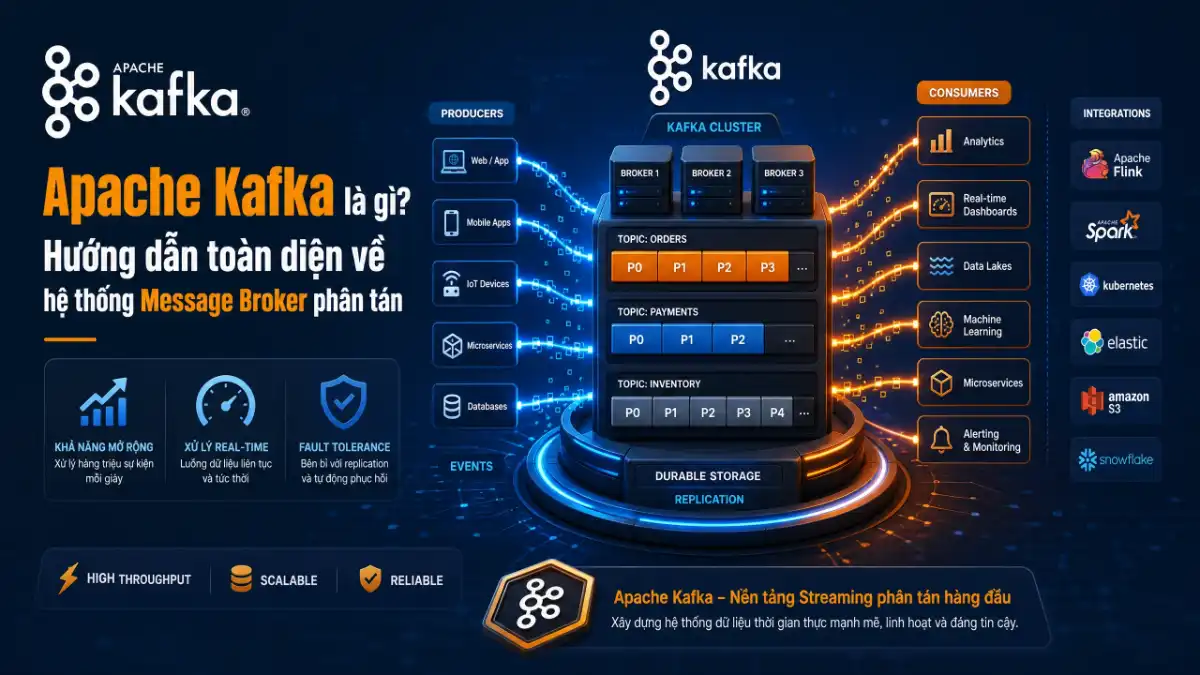
Hãy hình dung một nền tảng thương mại điện tử lớn trong ngày hội mua sắm Mega Sale: hàng triệu lượt nhấp chuột, hàng trăm nghìn giao dịch thanh toán, dữ liệu vị trí tài xế giao hàng và nhật ký theo dõi hành vi người dùng đổ về liên tục từng phần nghìn giây.
Nếu bạn để các microservices gọi trực tiếp lẫn nhau qua các giao thức HTTP REST API đồng bộ, toàn bộ hệ thống sẽ rơi vào tình trạng thắt cổ chai và tê liệt chỉ sau vài phút. Để xử lý dòng thác dữ liệu khổng lồ này một cách mượt mà và không bao giờ đánh rơi một bản ghi nào, câu trả lời tiêu chuẩn của các kỹ sư dữ liệu hàng đầu thế giới chính là tìm hiểu Apache Kafka là gì.
Thực tế thì câu hỏi Apache Kafka là gì đã trở thành chủ đề kiến trúc quen thuộc trong các buổi phỏng vấn vị trí Senior Backend và Data Engineer. Được khai sinh tại mạng xã hội LinkedIn và sau đó chuyển giao cho tổ chức Apache Software Foundation, Kafka đã phát triển vượt bậc để trở thành chuẩn mực công nghiệp xử lý luồng dữ liệu thời gian thực (Event Streaming Platform).
Nếu bạn muốn so sánh với các kỹ thuật hàng đợi tác vụ truyền thống, bạn có thể đọc lại bài viết về tối ưu hàng đợi xử lý bất đồng bộ và cơ chế xử lý tin nhắn nhẹ nhàng trong cơ chế Redis Streams và XNACK. Trong bài viết chuyên sâu này, mình sẽ cùng các bạn mổ xẻ rành mạch xem Apache Kafka là gì, 5 thành phần kiến trúc cốt lõi, cơ chế lưu trữ đĩa tuần tự siêu tốc và hướng dẫn triển khai hệ thống hoàn chỉnh.
1. Bản chất kỹ thuật: Apache Kafka là gì và triết lý Distributed Commit Log
Để hiểu thấu đáo Apache Kafka là gì, sai lầm phổ biến nhất là chỉ coi nó như một phần mềm Message Queue thông thường giống như ActiveMQ hay RabbitMQ. Theo bách khoa toàn thư Wikipedia về Apache Kafka, Kafka thực chất là một hệ thống message broker phân tán được thiết kế xoay quanh mô hình nhật ký phân tán chỉ cho phép ghi nối đuôi (Distributed Append-Only Commit Log).
Trong các hàng đợi tin nhắn truyền thống, tin nhắn sau khi được người nhận (Consumer) xử lý và xác nhận (ACK) sẽ bị máy chủ xóa bỏ ngay lập tức để giải phóng bộ nhớ. Ngược lại, khi khám phá Apache Kafka là gì, bạn sẽ thấy nó vận hành hoàn toàn khác biệt: tin nhắn một khi đã ghi vào Kafka sẽ được lưu trữ vĩnh viễn trên đĩa cứng trong một khoảng thời gian được cấu hình trước (ví dụ 7 ngày hoặc 30 ngày), bất kể tin nhắn đó đã được đọc hay chưa.
Mô hình Commit Log này mang lại 3 ưu thế vượt trội định nghĩa nên sức mạnh của Apache Kafka là gì:
- Khả năng đọc lại dữ liệu (Replayability): Nếu một dịch vụ backend gặp sự cố logic hoặc triển khai bản cập nhật mới, consumer có thể dễ dàng tua lại chỉ mục đọc (offset) để tái xử lý toàn bộ dữ liệu từ quá khứ mà không làm ảnh hưởng đến các service khác.
- Nhiều ứng dụng cùng đọc một luồng dữ liệu độc lập: Một sự kiện “Đơn hàng mới tạo” có thể được đọc đồng thời bởi Service Thanh toán, Service Kho vận, Service Gửi Email và Service Phân tích Big Data mà không cần nhân bản dữ liệu nhiều lần.
- Thông lượng xử lý cực đại (Massive Throughput): Kafka có thể tiếp nhận và truyền tải hàng triệu messages mỗi giây trên một cụm máy chủ thông thường nhờ tối ưu hóa cơ chế đọc/ghi tuần tự trên ổ cứng.
2. 5 Thành phần kiến trúc cốt lõi định hình nên kiến trúc Apache Kafka là gì
Sức mạnh chịu tải và khả năng mở rộng vô hạn của Apache Kafka là gì xuất phát từ sự kết hợp của 5 khối xây dựng cơ bản trong kiến trúc apache kafka:
1. Broker và Cluster trong Apache Kafka là gì
Một máy chủ chạy tiến trình Kafka được gọi là một Kafka Broker. Nhiều Broker kết nối với nhau để tạo thành một cụm Kafka Cluster phân tán. Mỗi Broker chịu trách nhiệm lưu trữ dữ liệu, tiếp nhận message từ nhà sản xuất (Producer) và phục vụ dữ liệu cho người tiêu thụ (Consumer). Nhờ tính năng phân tán, khi nhu cầu lưu lượng tăng cao, bạn chỉ cần bổ sung thêm các Broker mới vào cụm mà không cần dừng hệ thống.
2. Topic và Partition: Trọng tâm phân chia dữ liệu
Topic là danh mục hoặc tên kênh để nhóm các thông điệp có cùng ngữ cảnh (ví dụ: user-events, payment-transactions). Điểm thiên tài trong thiết kế Apache Kafka là gì nằm ở chỗ: mỗi Topic được phân chia thành nhiều Partition (phân vùng) vật lý độc lập. Mỗi Partition là một chuỗi các message có thứ tự nghiêm ngặt, được gán một số chỉ mục duy nhất tăng dần gọi là Offset.
Việc phân chia thành nhiều Partition cho phép dữ liệu của cùng một Topic được rải đều trên nhiều máy chủ Broker khác nhau. Nhờ đó, Kafka có thể tận dụng tối đa băng thông mạng và đĩa cứng của toàn bộ cụm máy chủ để xử lý song song, giải thích lý do vì sao Apache Kafka là gì lại có thông lượng vượt trội.
3. Producer và cơ chế phân phối Partition Key
Producer là ứng dụng xuất bản (ghi) dữ liệu vào các Topic trong Kafka. Trong hệ sinh thái Apache Kafka là gì, khi gửi một message, Producer có thể chỉ định một khóa (Partition Key): các message có cùng Key (ví dụ cùng user_id) sẽ luôn luôn được băm và gửi vào đúng cùng một Partition duy nhất, đảm bảo thứ tự thời gian tuyệt đối cho từng thực thể người dùng trong Apache Kafka là gì.
4. Consumer và Consumer Group: Cơ chế cân bằng tải linh hoạt
Consumer là ứng dụng đọc dữ liệu từ Topic. Nhiều Consumer liên kết với nhau tạo thành một Consumer Group. Điểm độc đáo của Apache Kafka là gì là quy tắc: mỗi Partition trong Topic chỉ được đọc bởi đúng một Consumer bên trong cùng một Consumer Group tại một thời điểm. Cơ chế này tự động mang lại khả năng cân bằng tải (Load Balancing) và phòng ngừa tranh chấp xử lý dữ liệu giữa các máy chủ worker.
5. Replication Factor và cơ chế ISR (In-Sync Replicas)
Để đảm bảo không bao giờ mất mát dữ liệu khi có máy chủ vật lý bị hỏng ổ cứng, mỗi Partition trong Apache Kafka là gì đều được nhân bản thành N bản sao (Replication Factor, thường đặt bằng 3). Trong đó, một Broker đóng vai trò là Leader (chịu trách nhiệm toàn bộ thao tác đọc/ghi), các Broker còn lại đóng vai trò là Follower liên tục đồng bộ dữ liệu. Danh sách các Follower bắt kịp tiến độ dữ liệu với Leader được gọi là tập hợp ISR (In-Sync Replicas).
3. So sánh kafka và rabbitmq: Đánh giá chi tiết trong kiến trúc Apache Kafka là gì
Một câu hỏi muôn thuở của các lập trình viên khi tiếp cận Apache Kafka là gì là khi nào nên sử dụng Kafka và khi nào nên dùng RabbitMQ. Là hai đại diện tiêu biểu cho mô hình message broker phân tán, mặc dù cả hai đều phục vụ truyền nhận tin nhắn bất đồng bộ, triết lý thiết kế của chúng hoàn toàn trái ngược nhau.
Bảng so sánh kafka và rabbitmq dưới đây sẽ vạch rõ ranh giới kỹ thuật giữa hai nền tảng:
| Tiêu chí đánh giá | Apache Kafka | RabbitMQ |
|---|---|---|
| Mô hình kiến trúc | Distributed Append-Only Commit Log | Message Broker truyền thống (AMQP) |
| Mô hình tiêu thụ | Pull-based (Consumer chủ động kéo) | Push-based (Broker đẩy về Consumer) |
| Lưu trữ dữ liệu sau khi đọc | Giữ nguyên trên đĩa theo thời gian TTL | Xóa ngay lập tức sau khi nhận ACK |
| Khả năng đọc lại (Replay) | Hỗ trợ tuyệt vời bằng cách tua Offset | Không hỗ trợ (trừ khi dùng plugin) |
| Thông lượng (Throughput) | Cực kỳ cao (hàng triệu rps) | Trung bình cao (hàng chục nghìn rps) |
| Định tuyến tin nhắn | Đơn giản theo Topic và Partition Key | Rất linh hoạt qua Exchange, Routing Key |
| Trường hợp sử dụng lý tưởng | Event Streaming, Big Data, Log CDC | Hàng đợi tác vụ phức tạp, RPC nội bộ |
Nhìn vào bảng so sánh, bạn sẽ thấy rõ: nếu bạn cần định tuyến tin nhắn thông minh theo nhiều quy tắc phức tạp và số lượng bản ghi vừa phải, RabbitMQ là giải pháp rất tuyệt vời. Nhưng khi bạn cần xây dựng một đường ống dữ liệu khổng lồ, xử lý hàng tỷ sự kiện mỗi ngày và cần khả năng đọc lại dữ liệu lịch sử, việc hiểu và triển khai Apache Kafka là gì là lựa chọn không thể thay thế.
4. Cơ chế lưu trữ đĩa tuần tự và kỹ thuật Zero-Copy trong Apache Kafka là gì
Nhiều người lầm tưởng rằng ghi dữ liệu xuống đĩa cứng (Disk Storage) sẽ chậm hơn rất nhiều so với lưu trữ trên bộ nhớ RAM. Vậy tại sao Apache Kafka là gì lại có thể đạt được tốc độ truyền tải hàng gigabyte mỗi giây khi lưu toàn bộ dữ liệu trên đĩa? Bí mật nằm ở hai kỹ thuật phần cứng đỉnh cao được các kỹ sư Kafka tận dụng triệt để:
Sức mạnh của I/O tuần tự trên đĩa cứng (Sequential I/O)
Theo tài liệu chính thức từ tài liệu Apache Kafka Documentation, việc truy xuất ngẫu nhiên (Random I/O) trên đĩa cứng cơ học hoặc thậm chí SSD sẽ tốn rất nhiều thời gian dịch chuyển đầu đọc. Tuy nhiên, thao tác ghi nối đuôi tuần tự (Sequential I/O) trên đĩa cứng có tốc độ nhanh gần tương đương với việc ghi vào bộ nhớ RAM (đạt hàng trăm MB/s đến GB/s). Bằng cách thiết kế Partition như một tệp nhật ký chỉ ghi nối đuôi, Apache Kafka là gì đã biến đĩa cứng thành một kênh truyền dữ liệu siêu tốc.
Kỹ thuật Zero-Copy loại bỏ chi phí sao chép bộ nhớ trong hệ điều hành
Trong các ứng dụng thông thường, khi chuyển một tệp tin từ đĩa ra mạng, dữ liệu phải trải qua 4 bước sao chép qua lại giữa Kernel Space và User Space. Kafka sử dụng lời gọi hệ thống sendfile() trên Linux (kỹ thuật Zero-Copy): dữ liệu được truyền thẳng trực tiếp từ Page Cache của hệ điều hành sang Network Socket Buffer mà hoàn toàn không cần sao chép vào bộ nhớ ứng dụng JVM. Điều này giúp giảm thiểu tối đa chu kỳ xử lý của CPU và loại bỏ gánh nặng dọn rác bộ nhớ (Garbage Collection) trong Apache Kafka là gì.
5. Hướng dẫn sử dụng Kafka: Triển khai cụm và hiểu rõ Apache Kafka là gì
Trước đây, để chạy được Kafka, bạn bắt buộc phải cài đặt thêm cụm dịch vụ điều phối Apache ZooKeeper để quản lý metadata. Kể từ các phiên bản hiện đại, Kafka đã chính thức loại bỏ ZooKeeper và chuyển sang cơ chế tự đồng thuận nội bộ gọi là KRaft (Kafka Raft Metadata Mode). Dưới đây là hướng dẫn sử dụng kafka thông qua Docker Compose đơn giản và chuẩn mực nhất:
# Tệp docker-compose.yml khởi chạy Apache Kafka với chế độ KRaft
version: '3.8'

services:
  kafka:
    image: apache/kafka:latest
    container_name: kafka_broker
    ports:
      - "9092:9092"
    environment:
      # Định danh Broker ID và chế độ hoạt động KRaft
      KAFKA_NODE_ID: 1
      KAFKA_PROCESS_ROLES: broker,controller
      KAFKA_LISTENERS: PLAINTEXT://:9092,CONTROLLER://:9093
      KAFKA_ADVERTISED_LISTENERS: PLAINTEXT://localhost:9092
      KAFKA_CONTROLLER_LISTENER_NAMES: CONTROLLER
      KAFKA_LISTENER_SECURITY_PROTOCOL_MAP: CONTROLLER:PLAINTEXT,PLAINTEXT:PLAINTEXT
      KAFKA_CONTROLLER_QUORUM_VOTERS: 1@localhost:9093
      KAFKA_OFFSETS_TOPIC_REPLICATION_FACTOR: 1
      KAFKA_TRANSACTION_STATE_LOG_REPLICATION_FACTOR: 1
      KAFKA_TRANSACTION_STATE_LOG_MIN_ISR: 1
      KAFKA_GROUP_INITIAL_REBALANCE_DELAY_MS: 0
      CLUSTER_ID: "MkU3OEVBNTcwNTJENDM2Qk"
    volumes:
      - kafka_data:/var/lib/kafka/data

volumes:
  kafka_data:
Để tìm hiểu thêm cách tối ưu hóa và bảo vệ các container dịch vụ khi triển khai, bạn có thể tham khảo bài viết về triển khai ứng dụng với Docker để vận hành hạ tầng an toàn tuyệt đối.
6. Lập trình Producer và Consumer với Python thực chiến trong Apache Kafka là gì
Để tương tác với cụm Kafka vừa khởi tạo, thư viện confluent-kafka (được xây dựng trên nền thư viện C cực nhanh librdkafka) là sự lựa chọn số một cho các kỹ sư lập trình Python. Dưới đây là mã nguồn thực tế minh họa cách đẩy và đọc dữ liệu trong Apache Kafka là gì:
1. Viết mã Producer đẩy sự kiện đơn hàng vào Topic
import json
from confluent_kafka import Producer

# Cấu hình Producer kết nối đến cụm Kafka
conf = {'bootstrap.servers': 'localhost:9092'}
producer = Producer(conf)

def delivery_report(err, msg):
    if err is not None:
        print(f"Gửi tin nhắn thất bại: {err}")
    else:
        print(f"Tin nhắn đã lưu tại {msg.topic()} [Partition: {msg.partition()}] offset {msg.offset()}")

# Dữ liệu đơn hàng mẫu
order_event = {
    'order_id': 'ORD-98214',
    'user_id': 'USR-1025',
    'total_amount': 250.75,
    'status': 'PENDING'
}

# Gửi sự kiện vào topic 'orders' với Partition Key là user_id
producer.produce(
    topic='orders',
    key=order_event['user_id'],
    value=json.dumps(order_event),
    callback=delivery_report
)

# Chờ đẩy hết tin nhắn đang chờ trong hàng đợi
producer.flush()
2. Viết mã Consumer xử lý sự kiện trong Consumer Group
import json
from confluent_kafka import Consumer, KafkaError

# Cấu hình Consumer thuộc nhóm 'payment_service_group'
conf = {
    'bootstrap.servers': 'localhost:9092',
    'group.id': 'payment_service_group',
    'auto.offset.reset': 'earliest'
}

consumer = Consumer(conf)
consumer.subscribe(['orders'])

print("Đang lắng nghe sự kiện từ topic orders...")
try:
    while True:
        msg = consumer.poll(timeout=1.0)
        if msg is None:
            continue
        if msg.error():
            if msg.error().code() == KafkaError._PARTITION_EOF:
                continue
            else:
                print(f"Lỗi Consumer: {msg.error()}")
                break

        # Giải mã dữ liệu nhận được
        order_data = json.loads(msg.value().decode('utf-8'))
        print(f"Đang xử lý đơn hàng: {order_data['order_id']} cho người dùng {order_data['user_id']}")

except KeyboardInterrupt:
    pass
finally:
    # Đóng kết nối an toàn để kích hoạt Rebalance trong cụm
    consumer.close()
Đoạn mã trên thể hiện rõ nét tính chất bất đồng bộ của Apache Kafka là gì: hệ thống nhận đơn hàng không cần biết ai sẽ xử lý đơn hàng đó, còn service thanh toán có thể tiêu thụ dữ liệu theo đúng nhịp độ xử lý của riêng mình mà không bao giờ bị nghẽn mạng.
7. Bảo đảm thứ tự tin nhắn và các ngữ nghĩa phân phối trong Apache Kafka là gì
Khi thiết kế các hệ thống tài chính hoặc ngân hàng, câu hỏi lớn nhất là liệu Apache Kafka là gì có đảm bảo thứ tự của tin nhắn và cam kết dữ liệu không bị nhân đôi (duplicate) hay không. Câu trả lời phụ thuộc vào cách bạn cấu hình các ngữ nghĩa phân phối (Delivery Semantics):
- At-most-once (Nhiều nhất một lần): Consumer cập nhật Offset ngay khi nhận message trước khi xử lý logic. Nếu worker bị crash trong lúc xử lý, message đó sẽ bị mất vĩnh viễn. Phù hợp cho việc thu thập dữ liệu log hoặc cảm biến IoT không quá quan trọng.
- At-least-once (Ít nhất một lần): Consumer chỉ commit Offset sau khi đã lưu trữ hoặc xử lý xong nghiệp vụ. Nếu worker crash giữa chừng, message sẽ được gửi lại cho worker khác xử lý tiếp. Nguy cơ ở đây là dữ liệu có thể bị xử lý trùng lặp (cần thiết kế logic Idempotent phía backend).
- Exactly-once (Chính xác một lần): Bằng cách kết hợp tính năng Idempotent Producer và Kafka Transactions, Kafka cam kết message chỉ được ghi nhận và xử lý duy nhất một lần, ngăn chặn triệt để hiện tượng trùng lặp số tiền hay sai lệch đơn hàng trong các ứng dụng tài chính.
Để bảo vệ các cổng API tiếp nhận đơn hàng khỏi nguy cơ bị spam request từ bên ngoài dẫn đến việc quá tải hàng đợi Kafka, bạn nên trang bị thêm kỹ thuật Rate Limiting bảo vệ API và điều phối mạng qua kiến trúc Load Balancer Nginx API Gateway.
8. Kinh nghiệm thực chiến từ Cypher: Vận hành và làm chủ Apache Kafka là gì
Trong quá trình vận hành các cụm Kafka phục vụ hàng trăm dịch vụ phân tán, mình nhận thấy phần lớn các sự cố nghẽn hệ thống đều xuất phát từ việc tính toán sai số lượng Partition hoặc không giám sát chỉ số Consumer Lag. Dưới đây là những nguyên tắc thực chiến sống còn mà bạn nên áp dụng khi tìm hiểu Apache Kafka là gì:
Nguyên tắc vàng của Cypher: Chỉ số Consumer Lag (khoảng cách giữa offset mới nhất được tạo và offset đã đọc) là nhịp tim của cụm Kafka. Nếu Consumer Lag tăng liên tục theo thời gian, các worker của bạn đang bị quá tải xử lý và dữ liệu của khách hàng đang bị trễ nghiêm trọng.
Những mẹo tối ưu bỏ túi khi vận hành Apache Kafka là gì:
- Công thức tính số lượng Partition: Số lượng Partition của một Topic nên bằng hoặc lớn hơn số lượng Consumer tối đa dự kiến chạy song song. Một Topic chỉ có 3 Partition thì bạn chỉ có thể chạy tối đa 3 Consumer trong cùng một nhóm; Consumer thứ 4 sẽ hoàn toàn ngồi chơi xơi nước vì không có Partition nào để đọc.
- Bật tính năng nén dữ liệu ở phía Producer: Sử dụng thuật toán nén
compression.type = lz4hoặczstd. Việc nén này giúp giảm tới 60-70% băng thông mạng và dung lượng lưu trữ đĩa cứng của cụm Kafka mà hầu như không ảnh hưởng đến độ trễ CPU. - Tuyệt đối không tăng Partition một cách bừa bãi: Dù nhiều Partition giúp tăng tính song song, việc có hàng nghìn Partition trên một cụm sẽ làm tăng thời gian phục hồi Leader Election khi có Broker bị sự cố và làm tốn nhiều tài nguyên mở tệp của hệ điều hành.
Bạn cũng có thể theo dõi mã nguồn và các bản cập nhật tính năng mới nhất trực tiếp tại kho mã nguồn Apache Kafka trên GitHub để luôn đón đầu các xu hướng kiến trúc tiên tiến của cộng đồng công nghệ thế giới.
Tổng kết
Tóm lại, Apache Kafka là gì không chỉ là một công nghệ đơn lẻ mà là một trụ cột kiến trúc không thể thiếu trong kỷ nguyên dữ liệu lớn và microservices. Bằng việc thấu hiểu Apache Kafka là gì và thay đổi tư duy từ hàng đợi tin nhắn truyền thống sang mô hình Commit Log phân tán chỉ ghi nối đuôi, Kafka mở ra khả năng mở rộng không giới hạn và độ bền vững dữ liệu tuyệt đối cho mọi hệ thống kỹ thuật số.
Sở hữu khả năng xử lý hàng triệu sự kiện mỗi giây với độ trễ tính bằng mili-giây, hỗ trợ đọc lại dữ liệu linh hoạt và đảm bảo thứ tự tin nhắn chặt chẽ, việc làm chủ Apache Kafka là gì sẽ giúp bạn tự tin thiết kế những hệ thống xử lý dữ liệu tầm cỡ thế giới.
Hy vọng cẩm nang phân tích toàn diện về Apache Kafka là gì này đã mang lại cho các bạn những kiến thức thực tế và những đoạn mã giá trị để sẵn sàng chinh phục các dự án quy mô lớn. Nếu có bất kỳ thắc mắc nào về cách cấu hình hay tối ưu hệ thống Kafka, hãy để lại bình luận để chúng ta cùng nhau trao đổi nhé!




![So Sánh Webhook và API Chi Tiết: Webhook Là Gì? [2026]](https://vnhte.com/wp-content/uploads/2026/06/webhook_vs_api_banner_final-660x347.webp "So Sánh Webhook và API Chi Tiết: Webhook Là Gì? [2026] 13")
![Theo Dõi Thay Đổi File Trên Linux Với inotifywait [2026]](https://vnhte.com/wp-content/uploads/2026/06/Theo-Doi-Thay-Doi-File-Tren-Linux-Real-Time-Voi-inotifywait-660x347.webp "Theo Dõi Thay Đổi File Trên Linux Với inotifywait [2026] 14")