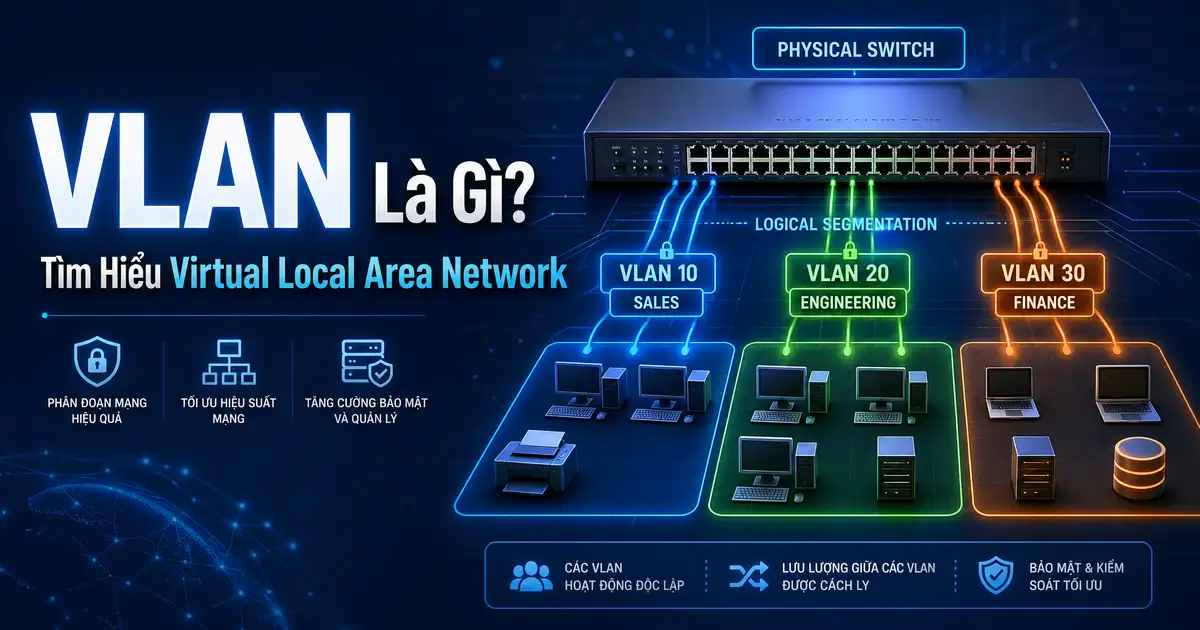
VLAN Là Gì? Tìm Hiểu Virtual Local Area Network là gì
VLAN Là Gì? Tìm Hiểu Virtual Local Area Network là gì — VLAN (Virtual Local Area Network) là công nghệ cho phép tạo multiple logical networks trên cùng một physical network infrastructure. Thay vì cần nhiều switches riêng biệt cho từng network, VLAN cho phép bạn segment network tại layer 2 sử dụng software configuration.
VLAN được định nghĩa trong standard IEEE 802.1Q, cho phép switches understand và forward traffic dựa trên VLAN tags thay vì chỉ physical ports.
Tại Sao Cần VLAN?
VLAN là gì
Trước VLAN, muốn tách mạng thành 3 phòng ban cần 3 switches riêng.Khi tìm hiểu VLAN Là Gì? Tìm Hiểu Virtual Local Area Network là gì, vLAN cho phép đạt điều tương tự chỉ với 1 switch và configuration.
2. Security Segmentation
Finance, HR, và IT departments có thể trên cùng physical switch nhưng hoàn toàn isolated.Khi tìm hiểu VLAN Là Gì? Tìm Hiểu Virtual Local Area Network là gì, không thể broadcast ARP hay sniff traffic giữa các VLANs.
3. Broadcast Control
Broadcast storms trong large flat networks có thể gây network congestion nghiêm trọng.Khi tìm hiểu VLAN Là Gì? Tìm Hiểu Virtual Local Area Network là gì, vLANs limit broadcast domains, chỉ broadcast trong cùng VLAN.
4. Flexibility và Scalability
Di chuyển user giữa departments không cần rewiring – chỉ cần thay đổi VLAN assignment trên switch port.
Các Loại VLAN
1. Default VLAN
Tất cả ports ban đầu thuộc VLAN 1 (default VLAN).Khi tìm hiểu VLAN là gì, không nên sử dụng VLAN 1 cho production vì security concerns và management simplicity.
2. Data VLAN (User VLAN)
Dành cho regular user traffic: computers, laptops, printers.Khi tìm hiểu VLAN là gì, thường là largest VLAN trong network.
3. Voice VLAN (VoIP VLAN)
Tách biệt voice traffic để đảm bảo QoS (Quality of Service).Khi tìm hiểu VLAN là gì, iP phones connect vào switch port được assign vào voice VLAN, đảm bảo voice traffic không bị delay bởi data traffic.
4. Management VLAN
Dành cho switch/router management traffic: SSH, SNMP, console access. Management VLAN nên isolated hoàn toàn và chỉ có IT staff access.
5. Native VLAN
Untagged traffic trên trunk ports được assign vào native VLAN. Best practice là không dùng VLAN 1 làm native VLAN và change native VLAN trên all trunk ports.
6. Management VLAN (Chính)
Dành riêng cho việc quản lý thiết bị mạng. Nên sử dụng dedicated VLAN không trùng với user VLANs.
VLAN Tagging – IEEE 802.1Q
802.1Q thêm 4-byte VLAN tag vào Ethernet frame:
- TPID (Tag Protocol Identifier) – 2 bytes, giá trị 0x8100 để identify 802.1Q frame
- TCI (Tag Control Information) – 2 bytes chứa:
- 3 bits cho Priority Code Point (PCP) – QoS priority
- 1 bit cho Canonical Format Identifier (CFI)
- 12 bits cho VLAN ID (1-4094)
Access Ports vs Trunk Ports
Access Ports
Kết nối end devices (computers, phones, printers). Chỉ thuộc một VLAN, không understand VLAN tags. Khi nhận frames, strip VLAN tag và forward vào VLAN đó.
Trunk Ports
Kết nối giữa switches/routers. Carry traffic từ multiple VLANs. Sử dụng VLAN tags để identify which VLAN mỗi frame thuộc về. Commonly used protocols: 802.1Q (standard), ISL (Cisco proprietary, deprecated).
VLAN Trunking Protocol (VTP)
VTP cho phép automatic VLAN propagation giữa switches trong same VTP domain. Khi bạn tạo VLAN trên VTP server, VLAN đó tự động được tạo trên tất cả VTP clients.
Inter-VLAN Routing
Mặc định, devices trong different VLANs không thể communicate vì broadcast domains khác nhau. Để enable inter-VLAN communication, bạn cần router hoặc layer-3 switch.
Router-on-a-stick
Router có one interface divided into sub-interfaces, mỗi sub-interface assigned to một VLAN. Router receives tagged traffic, routes between VLANs, và sends back tagged frames.
Layer-3 Switch
Switch với routing capability (như Cisco Catalyst series) có onboard routing processor. Inter-VLAN routing done in hardware, nhanh hơn router-on-a-stick.
VLAN Design Best Practices
- Sử dụng编号 không liên tiếp – Ví dụ: 10, 20, 30, 100, 200 để dễ đọc và future expansion
- Không dùng VLAN 1 – Change default VLAN và disable unused ports
- Prune unused VLANs – Không cho phép tất cả VLANs trên mọi trunk (VLAN pruning)
- Document VLAN assignments – Maintain accurate network documentation
- Separation of duties – Management VLAN tách biệt, chỉ có IT access
- Voice VLAN separate – Đảm bảo VoIP QoS không bị interference từ data traffic
VLAN Security Concerns
VLAN Hopping
- Switch spoofing – Attacker giả mạo switch, negotiate trunk và receive traffic từ multiple VLANs
- Double-tagging – Add extra VLAN tag để bypass port mode restrictions
Mitigation: Disable DTP (Dynamic Trunking Protocol) on ports, set access ports không đễ trunk, implement VLAN pruning.
Native VLAN Attacks
Attacker có thể inject traffic vào native VLAN và tag với VLAN ID khác. Mitigation: Set different native VLAN trên trunk ports (không dùng default VLAN 1), enable native VLAN tagging.
Voice VLAN Configuration Example
IP phone thường có 2 ports: một nối upstream (to switch), một nối downstream (to PC). Switch port được configure với voice VLAN và data VLAN:
- Voice VLAN: 100 (cho IP phones)
- Data VLAN: 10 (cho computers)
- QoS trust thiết lập trên switch port để prioritize voice traffic
VLAN Trunking Protocol (VTP) Modes
| Mode | Chức năng |
|---|---|
| Server | Create, delete, modify VLANs. Default mode. VTP advertisements synced. |
| Client | Cannot create VLANs. Receive và forward VTP advertisements. Must have same VTP password. |
| Transparent | Does not participate in VTP. Local VLANs only. Does not forward VTP advertisements. |
Common VLAN Numbers và Uses
| VLAN ID | Thường dùng cho |
|---|---|
| 1 | Default – không nên dùng |
| 10 hoặc 100 | User/Data VLAN |
| 20 hoặc 200 | Guest/WiFi VLAN |
| 30 hoặc 300 | VoIP/Voice VLAN |
| 99 hoặc 999 | Management VLAN |
| 1000+ | Industrial/SCADA systems |
Kết Luận
VLAN là công nghệ thiết yếu cho modern network segmentation. Nó cung cấp security, performance, và flexibility benefits mà không cần additional hardware investment. Hiểu cách VLANs work và implement chúng đúng cách là skill quan trọng cho bất kỳ network administrator nào.
Các Câu Hỏi Thường Gặp (FAQ)
1. Sự khác biệt giữa VLAN và subnet?
VLANs hoạt động ở Layer 2 (Data Link), subnetworks hoạt động ở Layer 3 (Network). VLANs segment broadcast domains; subnets segment IP address spaces. Thông thường, mỗi VLAN tương ứng với một subnet (VD: VLAN 10 = 10.0.10.0/24), nhưng một subnet có thể span multiple switches trong cùng VLAN. Inter-VLAN routing cần router hoặc layer-3 switch.
2. VLAN có giới hạn không?
3. Guest WiFi nên tách VLAN không?
Rất nên. Guest WiFi VLAN isolation guests khỏi internal resources. Guest users không thể access file servers, printers, hoặc internal systems. Đây là basic security practice cho any network có guest access.
4. VTP password có cần thiết không?
Có. VTP domain không có password cho phép bất kỳ switch nào trong domain thay đổi VLAN database. VTP password đảm bảo chỉ authorized switches participate trong VTP synchronization.
5. Khi nào nên dùng Layer-3 Switch thay vì Router?
Layer-3 switches cung cấp hardware-based routing, faster performance cho inter-VLAN routing. Router (router-on-a-stick) phù hợp cho small networks với vài VLANs. Layer-3 switches nên dùng khi có nhiều VLANs và cần low-latency routing giữa segments.
Tìm hiểu thêm về Firewall La Gi Tuong Lua Bao Mat Mang Chi Tiet và Nat La Gi Tim Hieu Network Address Translation.

Bài viết mới nhất

![So Sánh Webhook và API Chi Tiết: Webhook Là Gì? [2026]](https://vnhte.com/wp-content/uploads/2026/06/webhook_vs_api_banner_final.webp)
![Theo Dõi Thay Đổi File Trên Linux Với inotifywait [2026]](https://vnhte.com/wp-content/uploads/2026/06/Theo-Doi-Thay-Doi-File-Tren-Linux-Real-Time-Voi-inotifywait.webp)
Ủng hộ

MB Bank: 0969089335 - CHÂU QUỐC HÙNG

MB Bank: 0969089335 - CHÂU QUỐC HÙNG

Momo: 0969089335 - CHÂU QUỐC HÙNG