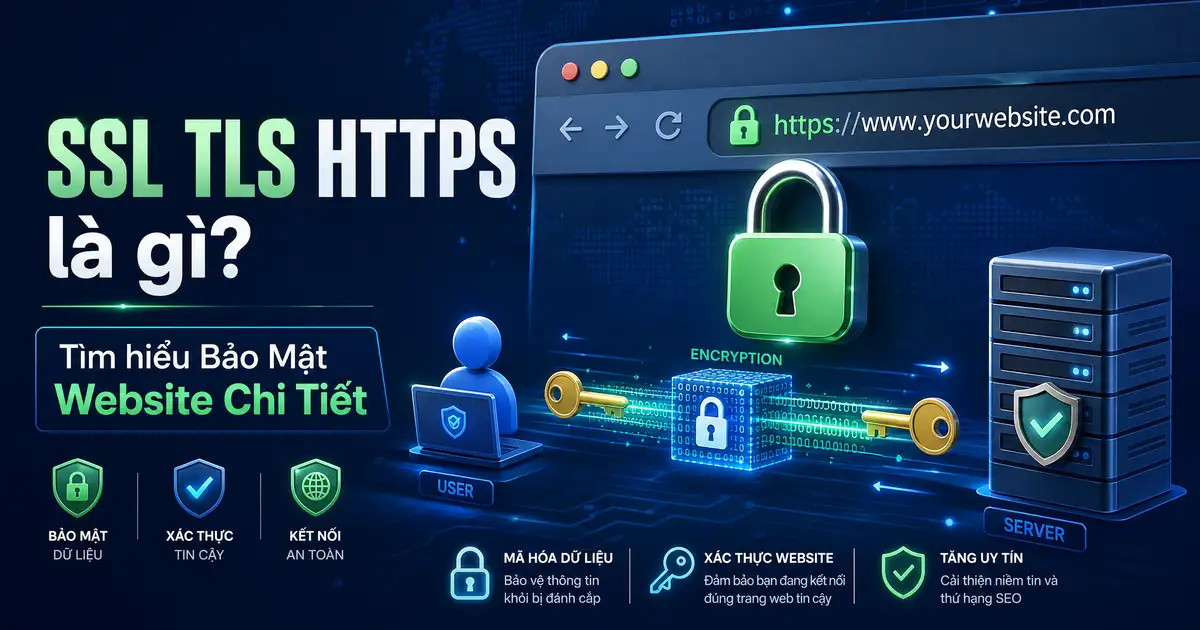
SSL TLS HTTPS là gì
SSL TLS HTTPS là gì — SSL (Secure Sockets Layer) và TLS (Transport Layer Security) là các giao thức mã hóa đảm bảo secure communication giữa client và server qua internet. HTTPS (HTTP Secure) là HTTP protocol được bảo vệ bởi SSL/TLS encryption.
SSL được phát triển bởi Netscape vào năm 1990s, sau đó evolved thành TLS 1.0, 1.1, 1.2, và mới nhất là TLS 1.3 (2018). Khi tìm hiểu SSL TLS HTTPS là gì, sSL đã deprecated hoàn toàn vì security vulnerabilities; ngày nay chỉ dùng TLS.
Tại Sao HTTPS Quan Trọng?
SSL TLS HTTPS là gì
Without HTTPS, data truyền qua internet là plaintext – anyone intercepting traffic (ISP, hacker, government) có thể đọc được sensitive information như passwords, credit cards, personal messages.
2. Xác Thực Identity
SSL certificate verify rằng website thực sự là website claimed. Khi tìm hiểu SSL TLS HTTPS là gì, certificate được issued bởi trusted Certificate Authorities (CAs) như DigiCert, Comodo, Let’s Encrypt.
3. Data Integrity
HTTPS đảm bảo data không bị tampered trong transit. Khi tìm hiểu SSL TLS HTTPS là gì, mỗi message có cryptographic checksum để detect modifications.
4. SEO Benefits
Google confirm HTTPS là ranking signal.Khi tìm hiểu SSL TLS HTTPS là gì, websites có HTTPS được boost trong search rankings.Chrome hiện mark HTTP sites as “Not Secure”.
5. Hỗ Trợ Modern Web Features
Nhiều browser features cần HTTPS: Service Workers, WebRTC, Geolocation API, HTTP/2, Push Notifications.Khi tìm hiểu SSL TLS HTTPS là gì, hTTP/3/QUIC bắt buộc phải có TLS.
SSL/TLS Handshake – Quy Trình Kết Nối Bảo Mật
TLS 1.2 Handshake (RTT – Round Trip Time)
- 1. Client Hello: Client gửi supported TLS versions, cipher suites, client random number
- 2. Server Hello: Server chọn TLS version và cipher suite, gửi server certificate, server random number
- 3. Certificate Verification: Client verify certificate chain against trusted CAs
- 4. Client Key Exchange: Client tạo pre-master secret, encrypt với server’s public key, gửi cho server
- 5. Session Keys Generation: Both client và server derive master secret từ pre-master secret, tạo session keys
- 6. Finished Messages: Both send encrypted handshake messages để verify keys match
TLS 1.3 Improvements
TLS 1.3 simplified handshake chỉ còn 1-RTT (một round trip) thay vì 2-RTT:
- 1. Client Hello: Client gửi supported ciphers, client key share (Diffie-Hellman parameters)
- 2. Server Hello + Finished: Server respond với key share, certificate, finished message
- 3. Application Data: Immediately encrypted – no extra round trip
TLS 1.3 also removes obsolete ciphers (3DES, CBC modes) và adds post-quantum security.
SSL/TLS Certificate Types
1. Domain Validation (DV)
- Chỉ verify domain ownership (email hoặc DNS record)
- Issued trong vài phút
- Phù hợp: blogs, personal sites, internal tools
2. Organization Validation (OV)
- Verify domain ownership + organization identity
- CA contact organization để verify existence
- Phù hợp: business websites, intranets
3. Extended Validation (EV)
- Thorough verification process, CA performs extensive vetting
- Green address bar với company name (đã discontinued 2019 nhưng vẫn used)
- Phù hợp: e-commerce, financial services, enterprises
4. Wildcard Certificate
Secure multiple subdomains với single certificate: *.vnhte.com covers blog.vnhte.com, shop.vnhte.com, etc.
5. Multi-Domain (SAN) Certificate
Secure multiple different domains với single certificate: vnhte.com, vnhte.net, app.vnhte.com.
Let’s Encrypt – Free SSL Certificates
Let’s Encrypt là free, automated, open Certificate Authority (CA)运营 bởi Internet Security Research Group (ISRG).Khi tìm hiểu SSL TLS HTTPS là gì, ra mắt 2016, đã issuance hàng trăm triệu certificates.
ACME Protocol
Let’s Encrypt sử dụng ACME (Automatic Certificate Management Environment) protocol để automate certificate issuance và renewal:
- Client initiates: ACME client (Certbot, acme.sh) requests certificate
- Domain validation: Client proves domain ownership via HTTP-01 hoặc DNS-01 challenge
- Certificate issuance: CA issues signed certificate
- Auto-renewal: Client auto-renews before expiration (90-day lifetime)
Certbot – ACME Client Phổ Biến
# Install Certbot
sudo apt install certbot python3-certbot-nginx

# Obtain certificate and auto-configure Nginx
sudo certbot --nginx -d vnhte.com -d www.vnhte.com

# Obtain certificate only (manual configuration)
sudo certbot certonly --nginx -d vnhte.com -d www.vnhte.com

# Auto-renewal check
sudo certbot renew --dry-run
Certificate Chain – Root, Intermediate, Server
SSL certificates tạo thành chain of trust:
- Root Certificate: Self-signed certificate từ CA, trusted by OS/browser
- Intermediate Certificate: Signed by Root, exists for security (revoke intermediate if compromised)
- Server Certificate: Signed by Intermediate, installed on your server
When visitor accesses your site, browser builds chain: Server Cert → Intermediate → Root. Browser verify each step until find Root it trusts.
Checking Certificate Chain
# Check certificate chain with OpenSSL
openssl s_client -connect vnhte.com:443 -showcerts

# Check certificate details
openssl x509 -in cert.pem -text -noout

# Verify certificate against CA bundle
openssl verify -CAfile ca-bundle.crt server.crt
TLS Cipher Suites
Cipher suite xác định encryption algorithm, key exchange, và authentication. Format: TLS_[KEY_EXCHANGE]_[WITH]_[CIPHER]_[MODE]_[MAC/AEAD]
| Cipher Suite | Key Exchange | Cipher | Mode |
|---|---|---|---|
| TLS_AES_256_GCM_SHA384 | – | AES-256-GCM | AEA |
| TLS_CHACHA20_POLY1305_SHA256 | – | ChaCha20-Poly1305 | AEA |
| TLS_AES_128_GCM_SHA256 | – | AES-128-GCM | AEA |
| TLS_ECDHE_RSA_WITH_AES_256_GCM_SHA384 | ECDHE | AES-256-GCM | GCM |
HTTP Strict Transport Security (HSTS)
HSTS header force browser chỉ connect qua HTTPS, prevent downgrade attacks:
Strict-Transport-Security: max-age=31536000; includeSubDomains; preload
- max-age: Seconds browser remember enforce HTTPS (1 year = 31536000)
- includeSubDomains: Apply to all subdomains
- preload: Submit to HSTS preload list (hardcoded in browsers)
SSL/TLS Termination
SSL termination là điểm decryption xảy ra – thường ở load balancer hoặc reverse proxy:
- Load Balancer: Terminate SSL, forward plaintext to backend servers
- CDN Edge: Decrypt at edge, encrypt back to origin (origin pull)
- Reverse Proxy (nginx): Handle SSL, proxy to upstream servers
Certificate Management Best Practices
- Auto-renewal: Use Certbot auto-renewal or ACME clients
- Monitoring: Alert before expiration (30, 14, 7 days)
- Private key security: Protect with restricted permissions (chmod 600)
- Key rotation: Rotate keys periodically, especially after suspected compromise
- Certificate transparency: Monitor CT logs for unauthorized issuance
- Perfect forward secrecy: Ensure new key exchange for each session
HTTP/2 và HTTP/3 với TLS
HTTP/2
- Require TLS 1.2+ (với some browsers yêu cầu 1.3)
- Multiplexing – multiple streams over single connection
- Header compression (HPACK)
- Server push capability
HTTP/3 (QUIC)
- Built on UDP (không phải TCP)
- QUIC protocol với built-in encryption
- 0-RTT connection establishment (TLS 1.3)
- Better performance on lossy networks
Common SSL/TLS Errors và Fixes
ERR_CERT_COMMON_NAME_INVALID
Certificate CN không match hostname. Fix: Ensure certificate includes correct domain hoặc use SAN certificate.
ERR_CERT_AUTHORITY_INVALID
Certificate không trusted by browser. Fix: Install intermediate certificate bundle hoặc use proper CA chain.
ERR_CERT_DATE_INVALID
Certificate expired hoặc not yet valid. Fix: Check server time, renew certificate.
Mixed Content Errors
Page load over HTTPS nhưng load HTTP resources. Fix: Update all resource URLs to HTTPS hoặc use protocol-relative URLs.
Kết Luận
SSL/TLS là nền tảng của internet security. HTTPS không chỉ là best practice mà là requirement cho modern web. Với Let’s Encrypt, không còn lý do gì để không có HTTPS. Auto-renewal và proper certificate management ensure continuous protection.
Các Câu Hỏi Thường Gặp (FAQ)
1. SSL và TLS khác nhau thế nào?
SSL là predecessor của TLS. SSL 1.0, 2.0, 3.0 đều deprecated vì security issues. TLS 1.0, 1.1, 1.2, 1.3 là versions hiện tại. “SSL” vẫn được dùng như informal term cho TLS certificates và HTTPS.
2. HTTPS có làm chậm website không?
3. Self-signed certificate có nên dùng không?
4. Làm sao redirect HTTP sang HTTPS?
5. Certificate expiration ảnh hưởng gì?
Tìm hiểu thêm về Cdn La Gi Tim Hieu Content Delivery Network Chi Tiet và Firewall La Gi Tuong Lua Bao Mat Mang Chi Tiet.

Bài viết mới nhất


Ủng hộ

MB Bank: 0969089335 - CHÂU QUỐC HÙNG

MB Bank: 0969089335 - CHÂU QUỐC HÙNG

Momo: 0969089335 - CHÂU QUỐC HÙNG